
Directed camera motion
A low tracking shot follows a moving subject with momentum, readable background streaks, and a deliberate camera path.
H3 Max capability exampleDownload video
Turn a written shot or a still image into a 5-15 second video. H3 Max is tuned for stronger prompt understanding, polished aesthetics, and rapid creative iteration.
Published results
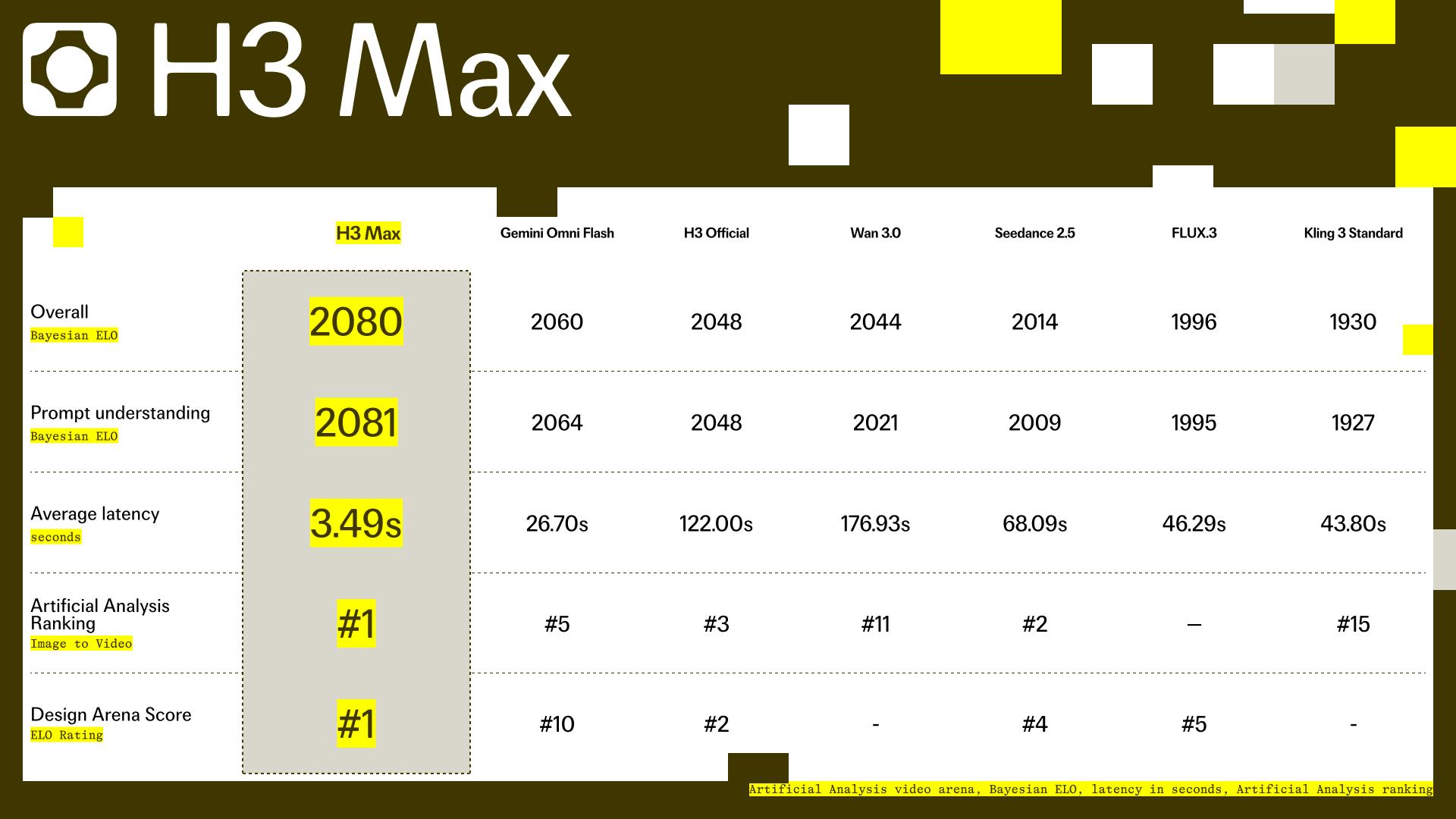
Independent arenas place H3 Max at the front of image-to-video preference, with major throughput gains reported over the base model.
#1
Image to Video with Audio
Top 3
Text to Video with Audio
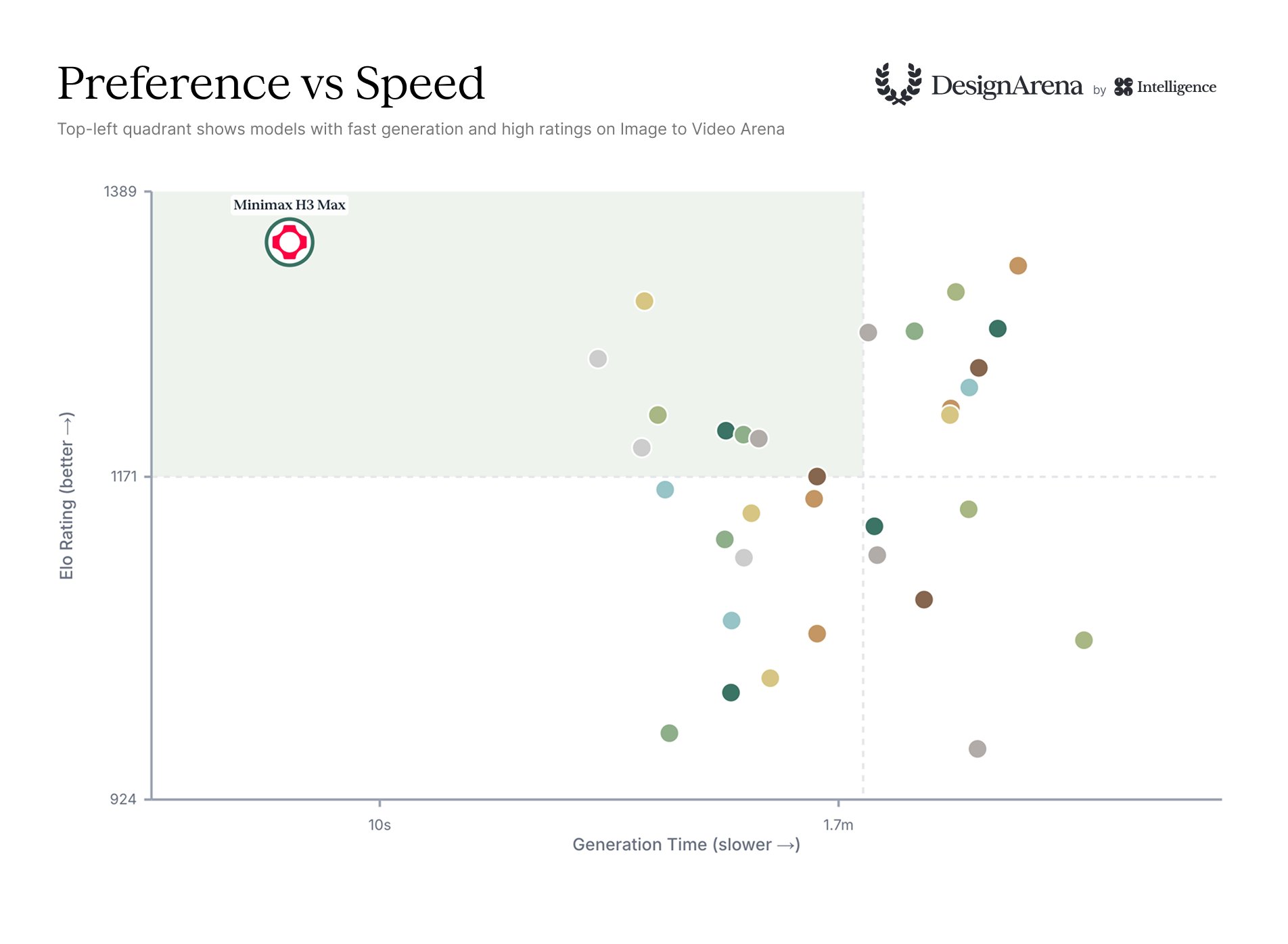
6.4s
Design Arena I2V generation time
Sources: Artificial Analysis and Design Arena. These rankings and timings reflect a snapshot from August 27, 2026 and may change with prompts, duration, resolution, queue conditions, and service configuration. Artificial Analysis · Design Arena
Design Arena reports that no tested image-to-video model achieved a higher preference score in less time. Its measured H3 Max runs were 18x faster than the arena average for image-to-video and 24x faster for text-to-video.
Built for iteration
H3 Max combines a focused video workflow with the controls creators need to explore motion quickly and repeatably.
Describe subject, action, camera, light, and timing in one shot brief. H3 Max was post-trained with new data and verifiable reinforcement-learning tasks.
Start from a still image and optionally define the final frame to give the generated motion a clearer visual destination.
Create text-to-video in six aspect ratios, from cinematic 21:9 to vertical 9:16, at 480P or 768P.
Keep the prompt untouched, expand it quickly with Balanced, or use Quality for a richer rewrite before generation.
A closer look
The practical advantage of MiniMax H3 Max is not a single visual trick. It is how quality, prompt interpretation, and turnaround time come together inside one focused workflow. A creator can describe a shot, render a first pass, notice what is missing, and try a more precise version while the original idea is still clear. That shorter loop changes how you make decisions: motion can be discussed instead of imagined, and a product angle can be tested before a full shoot is scheduled.
Start prompts with the subject and the action, then add the camera path, lighting, environment, and timing. Instead of writing a list of disconnected style words, explain the relationship between the elements: a camera follows the cyclist, the street lights streak across wet asphalt, and the rider slows before turning into frame. This gives H3 Max a sequence to interpret and gives you a useful baseline for the next variation.
Image-to-video is especially useful when the first frame already contains the brand, character, or product you need to protect. Upload the image, describe the movement around it, and use an end frame when the final composition needs to land in a specific place. The source image sets the visual anchor; your prompt supplies the change over time. For social formats, choose a vertical ratio early. For product or film work, compare a wide frame with a square crop before committing to a longer render.
Prompt expansion is a control, not a replacement for creative direction. Disabled mode is useful when every word is intentional. Balanced is a quick editorial pass for a clean brief. Quality spends more effort enriching the description when the scene has several beats, characters, or camera instructions. Keep the original prompt in your notes, compare the output, and adjust one variable at a time so you learn which direction improved the shot.
The benchmark numbers on this page are context for choosing a tool, not a guarantee for an individual render. Generation time changes with clip length, resolution, image uploads, queue load, and provider updates. The reliable promise of this workspace is control: clear settings, visible credit cost, a persistent task state, and a result you can review before deciding what to make next.
Image to video
Upload a first frame, describe the movement, and add an end frame when the final composition matters. H3 Max follows the source image aspect ratio automatically.
Image to VideoVideo cases
See how H3 Max handles camera direction, keyframe transitions, character consistency, art direction, visual transformation, and dialogue across six short examples.
A low tracking shot follows a moving subject with momentum, readable background streaks, and a deliberate camera path.
First-frame and end-frame references become one continuous transformation with a clear visual destination.
The same character holds its identity across changing locations, light, and shot direction.
A single art direction carries its palette, linework, texture, and lettering through a multi-shot sequence.
A stylized transformation study that tests shape continuity, timing, and visual rhythm in one pass.
A direct-to-camera performance with lip-synced speech, expressive staging, and a compact scene brief.
Simple workflow
Describe what changes over time, how the camera moves, and how the scene should feel.
Choose duration, resolution, aspect ratio, prompt expansion, and optional first or end frames.
Review the result, download the strongest take, or adjust the prompt and generate another variation.
Creative range
Explore product movement, campaign hooks, close-ups, and visual variations before committing to a full production.
Turn a scene description or storyboard frame into motion for pitches, treatments, and early editorial decisions.
Create landscape, square, or vertical clips for feeds, Shorts, Reels, and launch teasers.
Test typography, transitions, stylized animation, and camera language while an idea is still flexible.
Choose a one-time MiniMax H3 Max credit pack with clear balances, estimated 5-second video ranges, and secure checkout.
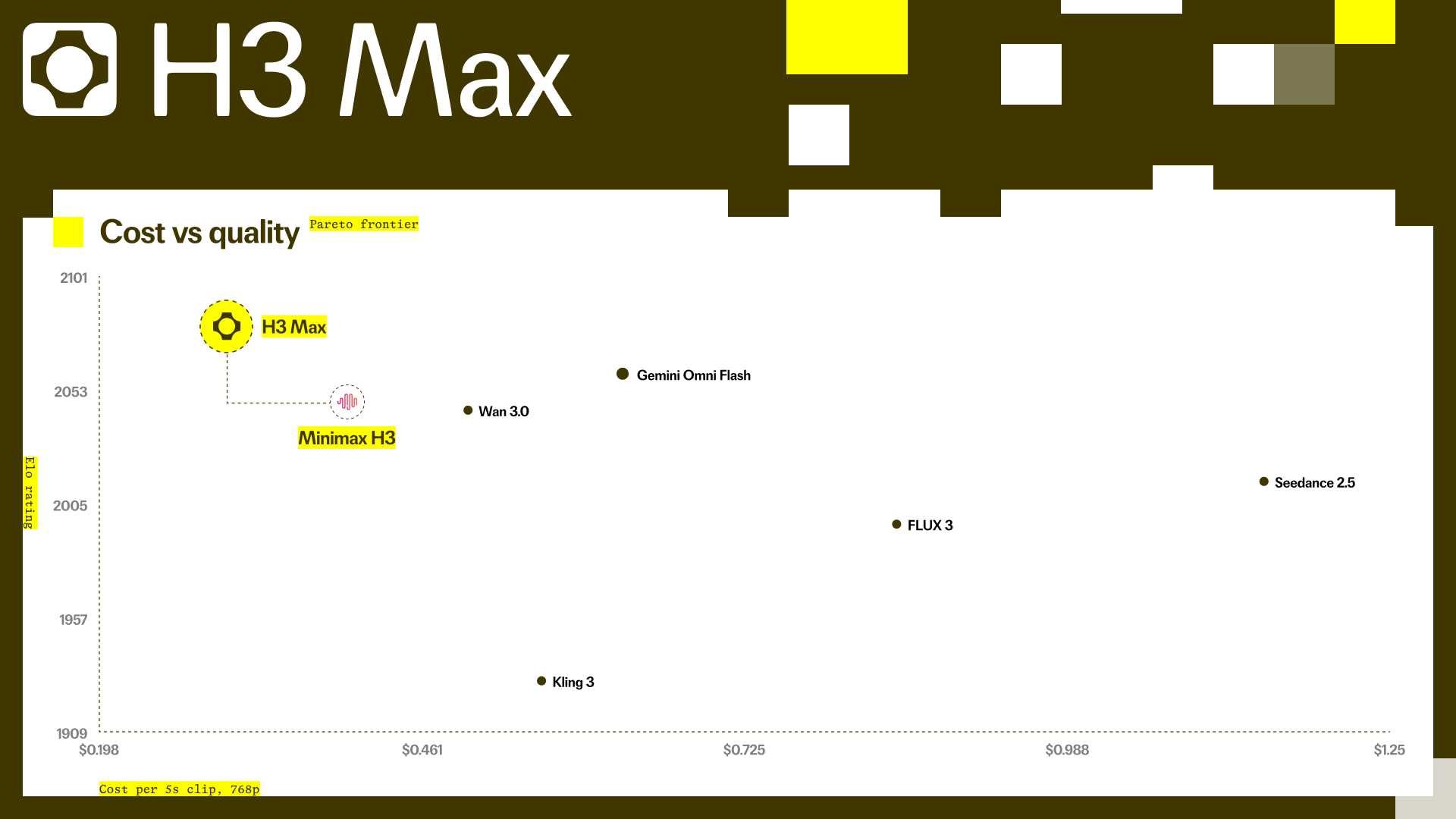
Cost and quality
The chart is a dated comparison snapshot, not a promise of identical output quality or cost for every prompt. Check the current pricing shown in the generator before rendering.
FAQ
Start with text or an image, shape the settings, and render your first H3 Max video.